

Portal Login Filler
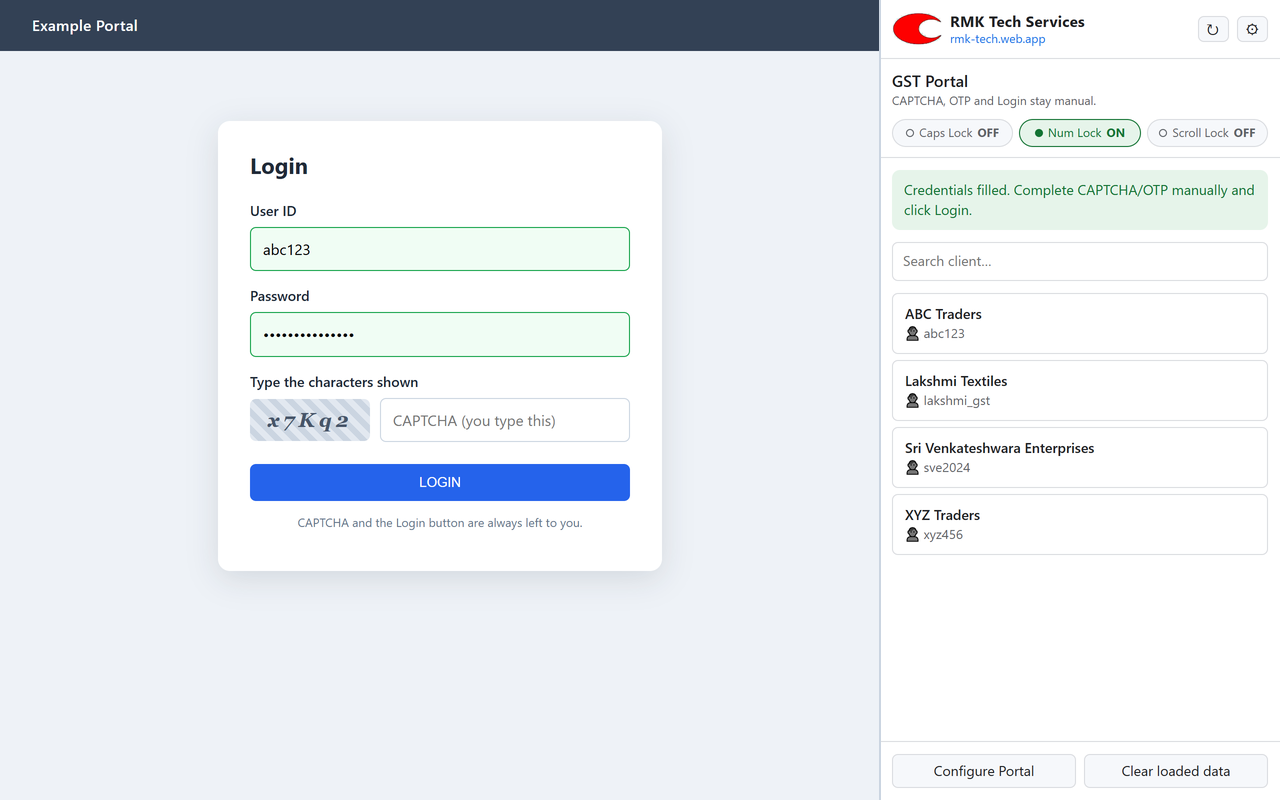
For accountants, tax practitioners and businesses who log in to many client accounts every day. Open the GST, Income Tax or EPFO login page, pick the client, and the User ID and Password are filled for you. CAPTCHA, OTP and the Login button stay with you.
Pricing
₹299/ year per Google account
Final price. No GST is charged. One-time annual payment; no automatic renewal.
15-day free trial: every feature, no payment details needed.
- Unlimited clients and portals
- Use on any computer signed in with the same Google account
- All updates during the licence year
- Email support
One licence covers one Google (Gmail) account, the account you sign in to the extension with. Payment is by UPI, card or netbanking through PhonePe; the licence is activated on that Google account.
Coming soon to the Chrome Web Store
Questions? rmk320044@gmail.com
How it works
Four steps, about five seconds
- 1
Open the portal
Go to the GST, Income Tax or EPFO login page in Chrome, as you do today.
- 2
Click the extension
The side panel opens, detects the portal and lists only that portal's clients.
- 3
Pick the client
Search by client name or User ID. One click fills the User ID and Password.
- 4
Finish and log in
Type the CAPTCHA, complete any OTP and click Login yourself.
Features
Everything a busy practice needs
Detects the portal automatically
Recognises GST, Income Tax, EPFO Employer and EPFO Employee login pages from the open tab and shows only the matching clients.
One-click fill
Fills User ID and Password into the portal's own fields, including modern pages built with React or Angular.
Income Tax two-step login
Fills the User ID on the first screen and the Password on the next, the way the e-filing portal works.
Your client list, your control
Keep clients in your own Google Sheet or Excel (.xlsx) file: Portal, Client, User ID, Password, Active.
Works on every PC
Sign in with the same Google account on office, home or laptop and the same client list is ready.
Search and active filter
Find any client instantly by name or User ID. Mark a row inactive and it disappears from the list.
Lock-key indicators
Caps Lock, Num Lock and Scroll Lock status at a glance, so case-sensitive CAPTCHAs and passwords go in right.
Configure Portal
If a portal changes its page, point at the User ID and Password boxes once. No technical skills needed.
Supported portals
Ready for the portals you use daily
| Portal | Website | Login style |
|---|---|---|
| GST Portal | services.gst.gov.in | User ID and Password on one screen |
| Income Tax e-Filing | eportal.incometax.gov.in | Two-step: User ID, then Password |
| EPFO Employer | unifiedportal-emp.epfindia.gov.in | Establishment login |
| EPFO Employee (Member) | unifiedportal-mem.epfindia.gov.in | UAN login |
| Other portals | Any login page you add | Set up in Settings with Configure Portal |
Your client list format
One row per login, in a Google Sheet or Excel file. Columns can be in any order:
| Portal | Client | User ID | Password | Active |
|---|---|---|---|---|
| GST Portal | ABC Traders | abc123 | •••••• | Yes |
| Income Tax | ABC Traders | ABCDE1234F | •••••• | Yes |
| EPFO Employer | XYZ Traders | MHBAN0012345000 | •••••• | Yes |
Security
Safe by design
- Never solves, bypasses or touches CAPTCHA
- Never automates OTP or two-factor verification
- Never clicks Login or submits the form
- Passwords are never shown, never logged and never written to disk by the extension
- Loaded data stays in memory only and clears after 15 minutes or when Chrome closes
- No servers of ours see your credentials. Data moves only between Google and your browser
Requirements
- Google Chrome on Windows, macOS or Linux
- A Google account (for the licence, and for Google Sheets if you use it)
- Your client list as a Google Sheet or Excel (.xlsx) file
Full details are in our Privacy Policy.
FAQ
Common questions
Does it solve the CAPTCHA or log in for me?
No, deliberately. It fills only the User ID and Password. You type the CAPTCHA, complete any OTP and click Login, so you stay in control of every login.
Where are my clients' passwords kept?
In your own Google Sheet or Excel file. The extension reads them when needed, keeps them in memory only for up to 15 minutes, and never sends them to us or anyone else.
Can I use it on more than one computer?
Yes. A licence is per Google account. Install the extension on any computer, sign in with the same Google account and use the same client list.
What happens after the 15-day free trial?
Buy a licence for ₹299 per year per Google account by UPI, card or netbanking through PhonePe. It is a one-time payment for 12 months, with no automatic renewal.
A portal changed its login page and filling stopped. What now?
Open the login page, click Configure Portal in the side panel and click the User ID and Password boxes once. We also release updates when portals change.
Is it connected to GSTN, the Income Tax Department or EPFO?
No. Portal Login Filler is an independent tool by RMK Tech Services and is not affiliated with or endorsed by any government body.
Portal Login Filler is an independent tool by RMK Tech Services. It is not affiliated with or endorsed by GSTN, the Income Tax Department or EPFO.