
Practical tech solutions for your business
RMK Tech Services builds custom software, specializes in Microsoft Access database solutions, and develops intermediate (middleware) software for tap-scan-print workflows on Xerox devices — all under one roof in Ballari.
About Us
Your local tech partner in Ballari
RMK Tech Services helps local businesses run smoother with dependable, no-nonsense technology support. We design and build custom software solutions, with deep, specialized expertise in Microsoft Access — from database design and query optimization to full desktop application development.
We also build and support intermediate (middleware) software for tap-scan-print workflows on Xerox multifunction devices — enabling secure tap authentication and smooth scan/print operations for businesses in and around Ballari.
Software & IT
Focus area
MS Access
Core expertise
Tap-Scan-Print
Also building
Ballari
Location
What We Do
Services built around your needs
Custom-Made Software
Bespoke software built from the ground up around your exact requirements — not off-the-shelf tools bent to fit, but a system designed specifically for how your business runs.
- End-to-end custom development
- Tailored to your exact workflow
- Built to scale with your business
Business Software Tools
Focused internal tools and workflow applications built around how your team actually works, designed to save time and cut manual errors.
- Requirement analysis & consultation
- Workflow & automation tools
- Ongoing maintenance & support
MS Access Expertise
Specialized, hands-on experience designing and maintaining Microsoft Access databases — turning spreadsheets and manual records into structured, reliable systems.
- Database design & normalization
- Forms, reports & query automation
- Data migration & troubleshooting
Tap, Scan & Print Software
Intermediate middleware software that powers tap-authentication, scan, and print workflows on Xerox multifunction devices — secure, fast, and easy for staff to use.
- Tap-to-print authentication setup
- Scan & print workflow configuration
- Integration & ongoing support
Why Choose Us
Reliable, local, and specialized
Local & Accessible
Based right in Ballari — easy to reach, and we understand the needs of local businesses.
Specialized Expertise
Deep, focused experience in MS Access solutions rather than generic, one-size-fits-all software.
One Point of Contact
From software to office equipment support, get help without juggling multiple vendors.
Responsive Support
Straightforward communication and timely follow-up when you need help — no runaround.

Portal Login Filler
“GST, Income Tax & EPFO logins in one click”
Built for accountants, tax practitioners and businesses who log in to dozens of client accounts every day. Open the portal, pick the client, and the User ID and Password are filled for you, while CAPTCHA, OTP and the Login button stay in your hands.
- 1Open the portalGo to the GST, Income Tax or EPFO login page in Chrome, as you do today.
- 2Click the extensionThe side panel opens, detects the portal and lists only that portal's clients.
- 3Pick the clientSearch by client name or User ID. One click fills the User ID and Password.
- 4Finish and log inType the CAPTCHA, complete any OTP and click Login yourself.
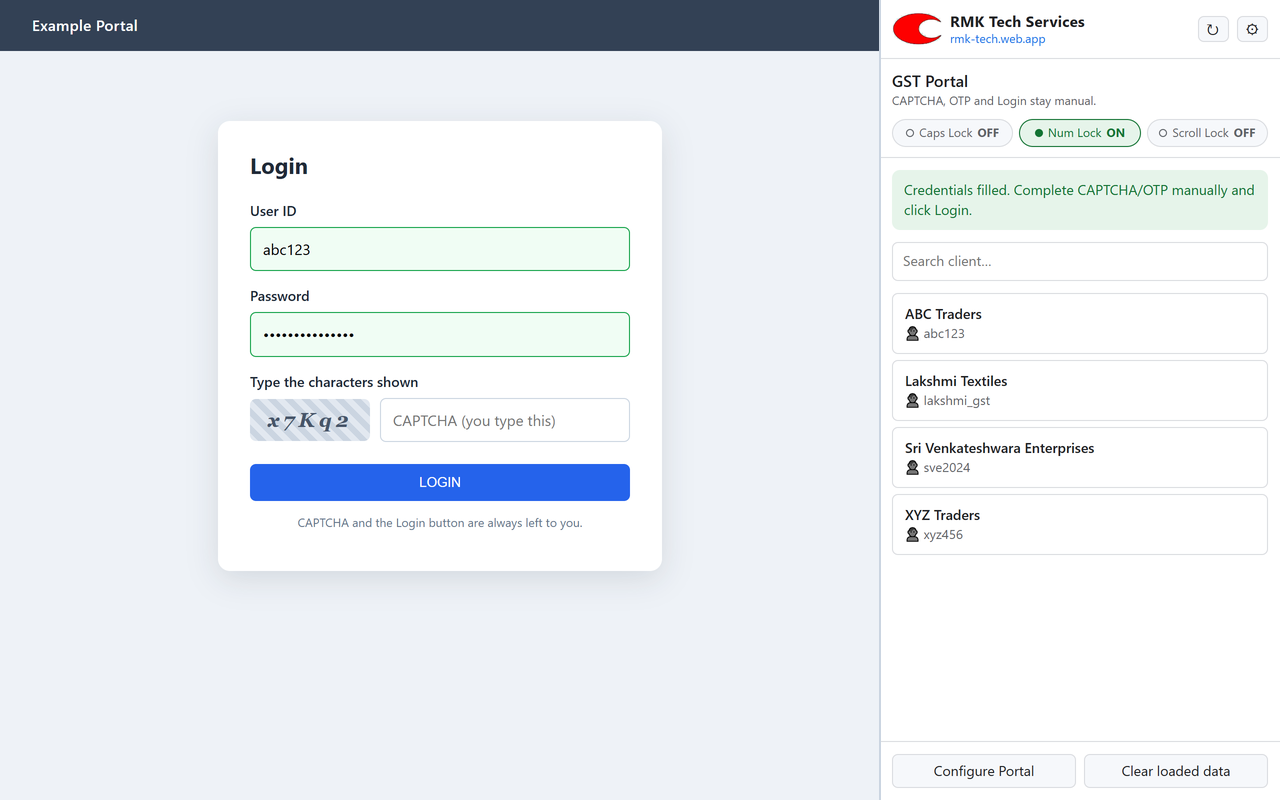
Detects the portal automatically
Recognises GST, Income Tax, EPFO Employer and EPFO Employee login pages from the open tab and shows only the matching clients.
One-click fill
Fills User ID and Password into the portal's own fields, including modern pages built with React or Angular.
Income Tax two-step login
Fills the User ID on the first screen and the Password on the next, the way the e-filing portal works.
Your client list, your control
Keep clients in your own Google Sheet or Excel (.xlsx) file: Portal, Client, User ID, Password, Active.
Works on every PC
Sign in with the same Google account on office, home or laptop and the same client list is ready.
Search and active filter
Find any client instantly by name or User ID. Mark a row inactive and it disappears from the list.
Lock-key indicators
Caps Lock, Num Lock and Scroll Lock status at a glance, so case-sensitive CAPTCHAs and passwords go in right.
Configure Portal
If a portal changes its page, point at the User ID and Password boxes once. No technical skills needed.
Humaniq TOS
“Jewellery Try-On, Reimagined”
A virtual try-on platform built for jewellery retail — customers preview any piece in real time with AR precision anchoring, letting your entire collection be experienced instantly without a single item leaving the display.
Visit humaniq.live- Real-time AR try-on anchored to earlobes, collarbone, wrists & fingers
- Multi-piece try-on — necklaces, earrings, bangles & rings together
- Stone Studio for live gem recoloring
- Offline, on-device AI processing with a native Android app
Get In Touch
Let's talk about your requirement
Reach out by phone, WhatsApp, or email — or stop by our Ballari office during business hours.
Phone
+91 7813 99 88 33
+91 7813 99 88 33
rmk320044@gmail.com
Address
No 78, GF, Ramanagar 7th Cross, Talur Road, Ballari
Ballari, Karnataka, India - 583101
Business Hours
Mon - Fri: 11:00 AM - 4:00 PM